How to Download NABL Certificate ?
Published 25 Apr 2025
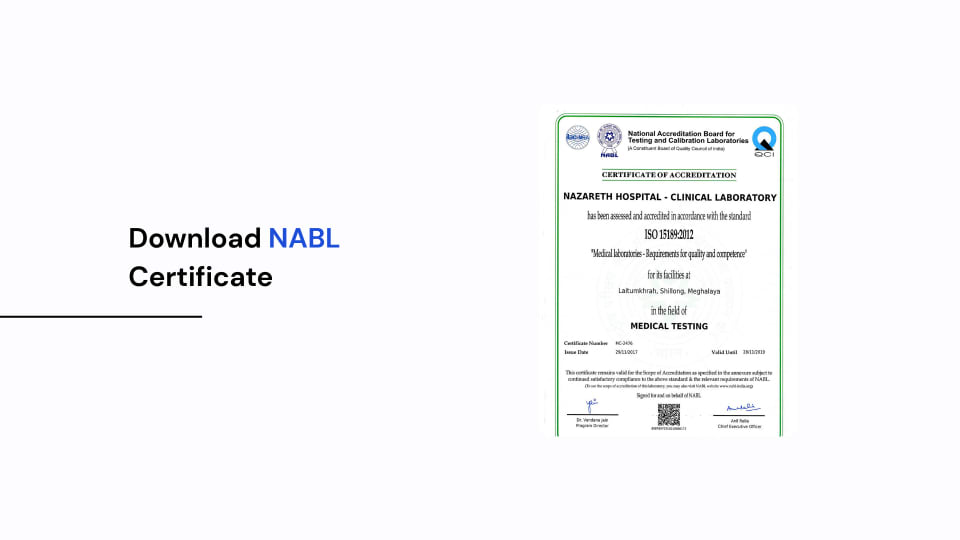
How To Download an NABL Certificate?
To check a lab's NABL certificate, the best way is to use the NABL India website. Any person (patient/doctor/lab owner/healthcare provider) can access the website to check if a laboratory has valid NABL accreditation.
Where can the certificate be found, and how can it be downloaded?
It is very simple. One can search for an accredited laboratory and find details of that laboratory along with the certificate/scope of accreditation, if available.
How to Search for a Laboratory?
NABL stands for the National Accreditation Board for Testing and Calibration Laboratories. It is a constituent board of the Quality Council of India (QCI).
Accreditations are granted to laboratories based on their conformity to standards and requirements.
The standard applicable to Medical Testing Laboratories is ISO 15189:2022.
The accreditation certificate shall be issued for a defined period. The scope of accreditation shall state the activities for which the laboratory was assessed and is competent to carry out. The accreditation certificate number is also mentioned in the scope of accreditation.
For further information, read What is NABL Accreditation?.
Step-by-Step: How to Download NABL Certificate?
To find an accredited laboratory and download the accreditation certificate, one needs to follow the steps below.
1. Go to the Official NABL Website
The website of NABL has ample information on NABL accreditation, listed laboratories, procedures to apply for accreditation, and other related information.
You can also visit the NABL Accredited Laboratory Directory directly.
This directory allows users to look up laboratories and view the details of their accreditation.
2. Use the Accredited Laboratory Search
On the NABL website, find the Accredited Laboratory or Laboratory Search sections.
The Directory provides options to assist users in looking up laboratories using name, location, certificate number or other information.
Narrow your search by selecting the relevant category.
For example, to review Pathology/Diagnostic Laboratories, select the category of Medical Testing Laboratories.
3. Enter Laboratory Details
You can look up laboratories based on the information that you have.
Information you can use to look up laboratories may include:
- Name of the Laboratory
- Certificate number
- City/State
- Laboratory category
- Pin code
- Discipline/testing field
It is easier to look up a laboratory if you have the NABL certificate number.
Certificate numbers of medical testing laboratories begin with MC-, while for testing laboratories it is TC- and for calibration laboratories it is CC-.
Make sure that the name of the laboratory and the location are correct.
4. Find and Select the Laboratory
Once you have completed the information, click the search button.
If any entries match your search criteria, a list of laboratories will be shown.
Now look at the information available on each laboratory.
Check the following details for each laboratory:
- Name and address
- NABL Certificate number
- Accreditation status
- Period of accreditation
- Scope of accreditation
If there are many laboratories with the same/similar name, review their certificate numbers and addresses to identify the correct laboratory.
This is particularly relevant to diagnostic companies with multiple locations.
5. Download the NABL Certificate (PDF)
Once you have identified the relevant laboratory, you may access the accreditation details/available certificate from the directory.
If the directory allows you to download the certificate or scope of accreditation, you may open and save the file as a PDF.
The download option may appear as a certificate number, certificate link or scope document, depending on the record and portal interface.
Follow the steps mentioned below:
- Open the relevant laboratory record.
- Access the available certificate or scope link.
- Open the document.
- Review the accreditation details.
- Use the download option to save the document as a PDF.
NABL accreditation certificates are valid for a defined period. If the certificate PDF is not available, you can still view the accreditation details through the NABL official directory.
You may also contact the laboratory or NABL for clarification.
One laboratory location’s certificate should not automatically be treated as accreditation for a different laboratory location.
Validity of Accreditation
Check that the dates are correct and ensure you have used the NABL directory to confirm the accreditation is still valid. Ensure it has not been suspended or withdrawn.
Scope of Accreditation
The accreditation does not give you full accreditation for all tests performed in the laboratory.
Make sure you can verify that the test/activity you are looking at falls under the approved scope of accreditation.
This is an important step to take when looking at medical laboratory reports.
Why Is It Important to Download and Confirm NABL Certificates?
It is very important to confirm that the lab is accredited to ensure the patient, doctor and professionals within the hospital and laboratory are assured.
Importance for Patients
Patients are interested in the results of tests performed in laboratories for diagnosis and treatment.
Importance for Doctors
Doctors base their clinical decisions on the results of tests performed in laboratories for diagnosis.
For Hospitals and Healthcare Providers
Accreditation documents are required when hospitals and healthcare organizations select a diagnostic partner.
Availability of certificate and scope facilitates review of accreditation of the selected laboratory.
For Laboratory Owners
Accreditation records are useful for laboratory owners when they prepare documents for hospital tie-ups, tenders, empanelments, etc.
They should review the documents to ensure they provide records of accreditation of the laboratory.
What Do You Do If You Can’t Find NABL Certificates?
Sometimes you may be unable to locate a laboratory and/or access their certificates.
This does not mean that the laboratory is not accredited.
Check the spelling of the laboratory name, location and certificate number. If your search is still unsuccessful:
- Search for the certificate number.
- Use the laboratory’s registered name.
- Verify the location of the laboratory.
- Check the available status of accreditation.
- Contact the laboratory to confirm the certificate details.
- Contact NABL for any clarification required.
Depend on the official accreditation information and do not assume a certificate is valid based on an image or copy of it.
Need Help Verifying NABL Accreditation?
Qualityveda supports laboratories across India in the preparation of documents, training and assessment readiness for NABL accreditation. Our support encompasses understanding accreditation and associated documents.
If you need help understanding a NABL certificate or verifying accreditation, contact us, and we will be happy to assist you.
You can check out our services and who they benefit by reading NABL Consultants - Who Are They? and What Services Do They Offer?.
FAQs
Q1. How to Download NABL Certificate?
You can download certificates from the official NABL website. Go to the list of accredited laboratories and search for your laboratory. Click on the certificate/scope document. If the option to download is available, download the PDF document.
Q2. Can We Download NABL Certificate Using Certificate Number?
Yes, you can view the accreditation details against the NABL certificate number. You can download the certificate as well, if it is available.
Q3. Can We Search NABL Accreditation Without Certificate Number?
Yes, you can search using the laboratory name, state, city or any other available option.
Q4. Are All Laboratories Listed on NABL Website Accredited?
You need to confirm the current status of the laboratory accreditation. The old data/certificates cannot be used to confirm the accreditation.
Q5. Is NABL Certificate Valid for All Tests Performed at Laboratory?
No, the accreditation is issued for specific tests/activities. The scope of accreditation is defined.
Q6. Where Can We Confirm NABL Certificate?
Accreditation details can be confirmed from the official NABL laboratory directory.
Final Thoughts
It is a good idea to download a NABL certificate.
The official website of NABL allows the public to search the list of accredited laboratories. You can view the certificate and scope of accreditation.
Before availing services of a laboratory, you can check their NABL certificate and accreditation details. Check if they meet the requirements of NABL. Analyse the certificate and check if the laboratory name, address, certificate number and date of issue are correct and match the available data.